Best ALR Screens for 4K 120Hz UST Projectors
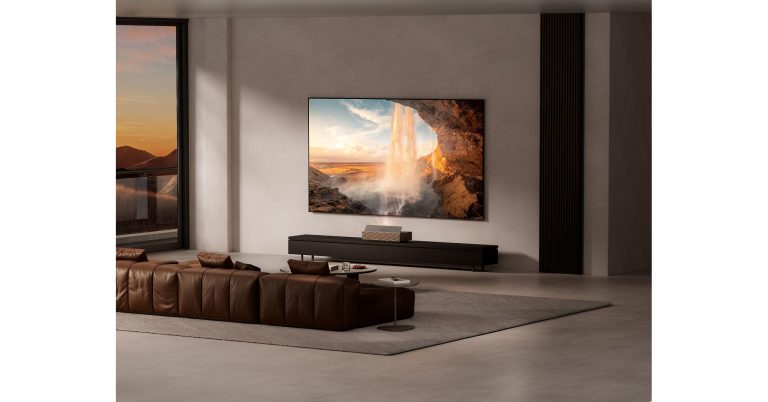
A 4K/120Hz UST projector is only half the equation. Ultra-short-throw projectors like the XGIMI AURA 3 Max and AWOL Vision LuxVision project upward at a steep angle from just inches off the wall — a physical geometry that a standard flat white or gray screen (or worse, painted drywall) handles poorly, scattering ambient light back at the viewer and washing out contrast. An ambient-light-rejecting (ALR) screen is built specifically to solve that problem, and pairing the wrong screen with a high-end UST projector will noticeably undercut the picture quality you paid for.
What an ALR Screen Actually Does
ALR screens use an optical coating or micro-structured surface designed to reflect light coming from a steep, low angle (where a UST projector sits) directly back toward the viewer, while absorbing or redirecting light coming from other angles — typically overhead room lighting or windows. The result is a picture that holds contrast and color saturation even with some ambient light in the room, instead of looking washed out the way a flat white screen or bare wall would under the same conditions.
This matters more for UST projectors specifically than for ceiling-mounted long-throw projectors, because a UST projector’s light path travels almost parallel to the screen surface before hitting it — exactly the geometry ALR coatings are engineered around.
Key Things to Check Before Buying
UST-Specific vs. Standard ALR
Not all ALR screens are built for UST projection angles. Standard long-throw ALR screens are optimized for light coming from a more head-on angle (from a ceiling mount, roughly perpendicular to the screen), while UST-specific ALR screens are engineered for the steep, near-floor projection angle a UST projector uses. Using a long-throw ALR screen with a UST projector can actually perform worse than no ALR coating at all, since the coating is rejecting light from the wrong direction.
Gain Rating
Screen “gain” measures how much light the screen reflects back relative to a standard reference white surface. Higher-gain screens (above 1.0) reflect more light back toward the viewer, which can boost perceived brightness but often narrows the effective viewing angle — people sitting well off-center may see a dimmer image. Most UST ALR screens fall in a 0.4–0.8 gain range specifically because they’re designed to work with a projector that’s already very close and bright, prioritizing contrast and viewing angle over raw brightness.
Screen Material and Texture
ALR materials generally fall into a few categories: fixed-frame rigid screens (best flatness and color uniformity, but not portable), motorized retractable ALR screens (convenience, but slightly more prone to minor waviness that can affect UST image sharpness at the extreme geometry involved), and CLR (Ceiling Light Rejecting) variants, which are a specific ALR subtype tuned for overhead lighting rather than side windows.
Size and Throw Ratio Match
Your projector’s throw ratio determines exactly how far it needs to sit from the wall for a given screen size — check your specific projector’s supported screen size range (for example, the AURA 3 Max supports up to 200 inches, LuxVision the same) before choosing a screen size, since an oversized screen for your available throw distance will force compromises in either image size or focus.
Does a Standard Wall Work Instead?
It can, and plenty of UST buyers start there. But a plain painted wall — even a well-chosen neutral gray — will underperform a purpose-built ALR screen in almost every measurable way: lower effective contrast, more visible ambient-light washout, and less color accuracy, since paint isn’t engineered with the same directional reflectance properties. For UST projectors above roughly $2,000, which increasingly includes 4K/120Hz flagships like the AURA 3 Max and LuxVision, pairing with a wall rather than a proper ALR screen means leaving real picture quality on the table.
How Much Should You Budget?
ALR screen pricing varies widely by size and material quality, but as a rule of thumb, budget somewhere in the range of 15–30% of your projector’s cost for a quality UST-specific ALR screen at a matching size — a meaningful additional investment, but one that directly protects the picture-quality upgrade you’re paying for in the projector itself.
Who Needs an ALR Screen
- Anyone installing a UST projector in a room with any daytime ambient light or overhead fixtures that can’t be fully dimmed
- Buyers of high-brightness UST flagships (5,000+ ISO lumens) who want that brightness to translate into usable contrast, not just a brighter wash of light
- Multi-purpose rooms where the projector needs to look good without a fully dark, dedicated home-theater setup
Who Can Skip It
- Buyers with a dedicated, fully light-controlled home theater room with no ambient light to reject
- Anyone using a lower-brightness portable or lifestyle projector (like the JMGO IRIS Ultra Max) primarily for evening or dark-room use, where a standard or matte white screen is a reasonable, lower-cost alternative
Frequently Asked Questions
Do I need an ALR screen for a UST projector?
Not strictly required, but strongly recommended for any room with meaningful ambient light. Without one, a UST projector’s contrast and color accuracy will noticeably underperform what the projector is actually capable of.
Can I use a regular projector screen with a UST projector?
You can, but standard (non-ALR) screens and long-throw-optimized ALR screens are built for a different light-rejection angle than UST projectors use, so picture quality — particularly contrast in ambient light — will suffer compared to a UST-specific ALR screen.
What gain rating should I look for?
Most UST-specific ALR screens fall in a 0.4–0.8 gain range, prioritizing wide viewing angle and contrast over raw brightness, since UST projectors are already bright at close range.
Is a fixed-frame or motorized retractable ALR screen better?
Fixed-frame screens generally offer better flatness and color uniformity, which matters more at high resolution; motorized retractable screens trade a small amount of that precision for the ability to hide the screen when not in use.
Conclusion
Pairing a 4K/120Hz UST projector with the wrong screen — or no dedicated screen at all — is one of the most common ways buyers undercut a genuinely high-end setup. A UST-specific ALR screen, matched correctly on size, gain, and material to your projector and room, is what actually lets flagship brightness and contrast numbers translate into a picture that looks as good as the spec sheet promises.